Showing posts with label Collaboration. Show all posts

Tuesday, October 4, 2022

Flipping Groupings

Having students work in groups is something that happens in all classrooms. Many teachers will give students roles to help focus their work. 

Recently I have seen a new kind of role enter the groupings - where teachers have students take on the role of a scientist, an economist, an environmental activist, it could be any sort of job, with the intent of having students use a different perspective when looking at a problem.

For example, I am calling a group that is formed by many roles a team, when the same roles come together, I am calling that a group. I hope I can keep them straight.

In the following team, the roles are artist, scientist, and journalist. This team would work together to solve the problem presented to them. 

Role Name
Artist Maria Anders
Scientist Alfreds Futterkiste
Journalist John Smith
 

However, instead of starting with the groups, start with grouping the roles. Put all scientists [insert role here] together. They will then research and build knowledge together. After a period of time, form groups. 

This would allow them to build and share knowledge which they could then bring back to their team.

This idea came to me when supporting an MYP Physics class and I made a connection to some research I have come across that stresses that content knowledge is a bigger factor in comprehension than reading skills.

Saturday, February 19, 2022

Making Co-teaching Successful

We are in a period of online learning - again. I think this is the third or fourth time that the whole school has gone online during this pandemic.


Photo by NeONBRAND on Unsplash


When we first started teaching online, I was a homeroom teacher. My role was very straightforward. Since then I have moved to a support role as PYP Learning Support and Technology Coach. With this new role, I have more flexibility to join lessons as needed, but I find that since I am not in planning sessions with teachers (something I am pushing for) I can be called at any time to help with a lesson. When it is simply to be another adult in the room, there is not much need to go over things. But when I am being asked to co-teach a lesson, I can sometimes rush into it without fully knowing what the lesson is about. 

Yeah, I get excited to help others.

But today I went to a lesson and it was just an OK lesson. This was because I didn't have time to prepare and think through what I was going to be doing. I was given a lesson outline then a little while later I was to deliver. 

It didn't help that this lesson was online.

After the lesson, I was reflecting on how it could have been better since this situation will happen again -- online or in person. I came up with a few simple things my teachers and I could do before we teach together.

Develop a relationship with your co-teacher
  • Co-plan
  • Co-prepare
  • Practice together before a lesson
  • Reflect together
It looks very obvious, but unless it is made into a norm -- a part of the school's culture, it can be tricky to put into practice.

Thursday, February 13, 2020

Another Round of Apple Teacher - "Oh! This is what I want to know."


Last year I was approached to help teachers learn how to use their new Macbooks. I had led some teachers through the Apple Teacher program at my previous school and it was pretty successful, so I thought trying it again here would be a good idea.

Last year did not work out, so we tried again this year. With the interested teachers signed up and all the surveys sent, we had our meeting day. Then, three teachers showed up. Well, two is better than none.

Here are a few reflections from trying Apple Teacher at this school.


These are not the Tech Ambassadors

At my last school, the Tech Ambassadors were teachers who were selected to join the program based on what division in the school they taught in and their tech skills. I based my prediction that they would finish this training in an hour on that last cohort.


Get Your Apple ID!

If teachers have their IDs on hand (with passwords) things will go smoother. Unfortunately, not all did. No problem, if you do not remember your ID, you can "easily" create a new one.


Taiwan is not an Apple Teacher Country

Just be careful if you are in Taiwan. I am sure there are other countries, but one teacher is from Taiwan so put that as her home. Apple does not recognize Taiwan in the application form so she ran into problems signing up.


"Oh my gosh. Look at this!"

It was great to hear and see teachers learning how to use their hardware and software better. One reason I told them to take the course is to learn how to better integrate the Apple products into their teaching. Or if not Apple - do something similar with Google or Microsoft, etc. Use online courses as a way to learn new ways of teaching (or find what you don't like in them).


Time and Space

I think the best reason to get teachers together is to give them time and space to work on what they are interested in. Like one teacher said, "If I could come into your room during lunch, I would work on this."

OK, you are welcome anytime.

Tuesday, January 2, 2018

A Digital Readers Theater


I read the story, Ganesha and the Curse on the Moon, for my students and they really liked it. So, I started thinking about plenary activities for them to do and decided we would act out the book as a play.

Right away I could see the vocabulary would be a challenge and there would need to be a lot of time to practice lines. I also wanted a way to share their performance more than once.

I made the book into a script and printed out enough copies for all the students. Each student was able to choose a part. They could be a reader, someone who reads the lines, an actor, someone who controls the puppets, or a narrator. After they chose their parts, I highlighted it for them so it was easier to read.

I started by trying to record the audio separately and was going to put the audio together with the video. iMovie doesn't allow you to tag, or rename clips. So the audio and the video got jumbled and were difficult to put together. The actors did not know when to do what because they could not hear the readers.

One of the things I did right, was to use the mic on my earbuds to get better sound quality. And although we had to film in the hallway, and it got noisy, the mic made the sound audible.

In the end, I ended up just filming the students acting out and reading the parts and then doing the reshoots right then and there.

Sometimes simple is best.

Use Blogger to Create a Searchable Database of Your Twitter Favorites

When I first became a technology coach, I wanted to be able to share the interesting ideas I found on Twitter.

I used several different services that allowed me to save Tweets or Posts, but they all lacked the ability to tag posts. Searching for posts is great if you know what you are looking for, but I wanted to find a service that would also allow me to tag posts.

In my research to find the right tool, I stumbled on an applet on ifttt.com that saves Twitter posts that you favorite on Twitter, to a Blogger blog. ifttt.com stands for if this then that and is a site that allows you to create workflows between apps.

This was great because, with a blog, you can search the entire site as well as tag posts. (I suppose there is one for Wordpress too, but I prefer Blogger.)


Two ways to search


1. Head over to ifttt.com to get started

Sign up for an account if you don't have one. You will also need to connect your Blogger account and your Twitter account so ifttt can access and modify them.


2. Create a new applet

Find your username in the upper right-hand corner and click on it. Then select New Applet.


3. Select actions


You will need an if and a that. For this example, the if is a like on Twitter, and the that will be new Blogger post.


Click on +this and select Twitter.


Then choose your that

4. Customize the action fields
Since this is a new Blogger post, there are several ways to customize it: post title, body, labels. Select which ingredients you want to add. 


Here is how I customized my applet.


Be careful to add text to the Title ingredient, otherwise, your posts will look like mine did below.

WHAT MY POSTS LOOKED LIKE BEFORE CUSTOMIZING THE TITLES FIELD

In the end, you will have an applet that looks like this.


This is not the perfect tool for me yet, I still have to go in to adjust labels, but this is much easier than what I was doing before.

Monday, November 6, 2017

Should We Block Google Translate? No Way

This post was started all the way back in 2013. I saw it in my drafts column, and having had a conversation with my wife about this very subject, decided it was time to come back and finish my thoughts.


I came across a share on Google+ by +Jay Atwood that was linked to a blog post called Should We Block Google Translate? by Jen Roberts.

The other day I was having this same conversation with my wife.

I argued they should be able to use it.
But, the results are not very good.
Yes, so tell them that. Then tell them they have to work with a partner to make the translation better afterward.

I really don't have another reason other than that. Google Translate is a tool people actually use, so why not let students use it to see its limitations. As Jen says in her post, even with a calculator you need to know the math before you can use it to solve a complex problem.

With Google Translate, I see it more as an opportunity to solve the problem collaboratively.


Below in gray were my notes at the time.
When I saw this I clicked it to find that


Disagree
Using Google translate is a form of plagiarism. It's cheating and students who cheat on homework won't know the material for the test in class, nor will they have the language skills they need for life in a global society.

Are dictionaries allowed? Professional translators use them all the time. What if I translate one word from a dictionary? Is that a form of plagiarism? Do I need to cite my source?

?
nor will they have the language skills they need for life in a global society


Agree
Long ago, my district used to block Wikipedia. Students used it at home, but at school we had no access to show them why it was not a good source. If you block translate language teachers will be in the same position. Students will use it at home, but at school teachers won't be able to demonstrate why it fails.

Further, correcting translations is probably a very authentic task for a modern linguist. (People get paid to do this.)


http://whatdoyouteach.blogspot.jp/2013/05/should-we-block-google-translate.html

http://edudemic.com/2013/05/how-online-translation-tools-are-now-being-used/


 This reminds me of the calculator debate in elementary mathematics.

Friday, November 3, 2017

Friday, October 20, 2017

Grade 1 Collaborative Storytelling


Today was a good day.

We spent most of the morning collaborating on a story we helped make for Traveling Tales. The kids were really into making the story, and this time I was more comfortable since I remembered what had happened last time. This time I pushed the story along more instead of waiting too long for more ideas. Once I heard a good idea we moved on to the next part so putting the pieces together did not take too long.


After we all talked together about the story by recapping what happened first. We recapped the first part of the story frame-by-frame.

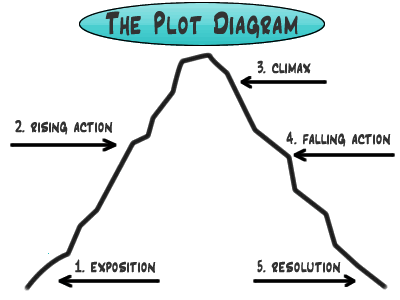
When we moved on to brainstorming what could happen next, the students tried to write the entire rest of the story including the ending, so I then showed them that there are, in fact, five different classes making the story. We reviewed the Story Mountain and how the part we were writing, the build-up, was still in the beginning of the story, so you can't give away the ending yet!

Brainstorming as a class allowed me to show students how a title should have something to do with the story (and at their age, everything to do with the story). We talked about a lot of vocabulary: pyramid, desert, haunted, cool down, thirsty; and I could talk with them about how we were given a title "The Haunted Pyramid", so maybe [definitely] they should keep that in mind when they are in groups drawing their pictures.

Each of the 5 parts in the story has 5 parts. So, the build-up has five parts; which is nice since we have five table groups. I asked all students to draw a picture. In their respective groups, they were then to show their group members the picture they had drawn and vote, or decide somehow, whose picture would be selected so each group would have one picture.

I remember thinking how well it was going and I remember thinking that this is what teaching should look like.

I even remembered to add the annotations in Adobe Spark this time so when the recordings were muddled, the other groups could still see what the story was.

Tuesday, October 3, 2017

Participating in the Traveling Tale

Back to the classroom, back to collaborative projects.

Traveling Tales is a project I've had my eye on for a few years, and now that I have my own class again, I was able to participate.

Traveling Tales uses a five-part story format with each school taking one of the five parts. Our part was the problem in the story, and since we haven't talked about the five-part story format before, there was some front loading to do for this project.

At first there were crickets in the room when we were talking about this. I remember looking at the black faces and thinking I'd made a mistake trying this out. And that was after the technical difficulties.

But after some prompting and discussion, the story clicked with one boy. He used his reading time to get more ideas for the story by reading about different sea animals and taking notes. After reading, he led the class through his idea of what the problem should be.


Now that it's finished, I remember that I forgot to add the annotations in the video. And I now know I need to get that recording box finished.


Tuesday, July 4, 2017

Book Creator Chat

Since I discovered it, I have spread the news about Book Creator to whoever will listen. So when I saw that Book Creator was looking for ambassadors, I thought I might as well have a title for what I am doing anyway.

Then late this spring the Book Creator team sent out an email asking for help with the chat series they were going to have over the summer. Thinking I would have nothing to do, I signed up for the chat on June 29th. But as the chat drew closer, things my schedule started getting tighter. I am staying with my in-laws this summer and in addition to the work to do around the house, I am volunteering at a local school and looking for a place to live for next year across the country.

I am glad I went through with it but there are a few things to watch out for when hosting a Twitter Chat.

  • time differences - do you know the exact time the chat will happen?
  • international collaboration - how engaged are you? do you have a plan?
  • chat timing - what else is going on?
  • questioning - do you have questions that will engage everyone joining?

See below for the full chat. Or click here if it is not showing up.

Friday, March 24, 2017

Leverage Your PLN

I joined Twitter professionally in 2010 or 2011. I was on before that, but I was only using it socially.

For a while, I had two accounts running, one personal and one professional. This worked until I realized I was wasting a lot of time switching between the accounts. Whenever I flip between accounts, I am bound to accidently post to the wrong one.

And that's what happened.

How to Cultivate a Personal Learning Network

I reflected on why I had two accounts and decided I didn't need two. So I deleted one.

I have spent a lot of time building relationships. This is work - it involves helping other teachers when I can, answering questions, and sharing. Most of all, it takes time.

I was reminded of this when a teacher asked me to search for some resources for her. I knew of a Twitter contact who had the answer for her, and a little while later I had a starting point for her.

She was then interested in joining Twitter, which is great and I encouraged her to do it, but I cautioned her that it is a long process. Mine is several years in the making and I feel I still have a lot of room to grow.

*One tip I give teachers when they join Twitter is to find hashtags, then follow people from within the hashtags.