Showing posts with label MYP Design. Show all posts

Monday, May 11, 2026

MYP Design Vibe Coding Unit Reflection

I got a little behind on my grading, and I can see the issue now, and I will try not to make the same mistake next year.

This year, I allowed students to redo assignments after I graded them. I did not put any constraints on it; I just said anything. As a result, I had a hard time motivating students. 

I started the second semester with a unit in Vibe Coding. This was an assignment that I thought of based on a conversation with a friend and a podcast episode I had just heard. I had intended it to be a way to improve the students' AI skills. 

We did include a checklist at the top of the assignment, 
  • I followed my specifications
  • I made an adequate prompt
  • I made additional prompts
  • I did some actual coding
  • I looked up code to solve an issue
The checklist was good for the students for sure. But for next time:
  • It would be good if the students talked about the prompts with other students,
  • It is necessary to ask the students to write the prompts they used,
  • We should have had a lesson or two about prompting, but we were time constrained. Next time I would build that in.
Reflection
  • The prompt was the most technical part of this criteria. 
  • I need to be clear on the outcomes beforehand. That is what really got me. This unit was put together too quickly and next year I will watch for that.

Monday, March 9, 2026

Vibe Coding with Claude

Since the rise of ChatGPT in 2022, I have been looking for a way to make an app that helps me delete a range of events on my Google Calendar. 

Right away, I was able to get a Google Apps script out of ChatGPT, but I could not figure out how to get the interface right. So, I put the idea on the shelf.
image via vecteezy.com

This year in MYP Design, I tried a unit about Vibe Coding. 

I was hoping that I could accomplish a few things with this unit. 
  1. I wanted students to have a chance to use AI tools if they had not yet tried them. 
  2. I wanted students to see both the benefits and the limitations of AI.
  3. I also wanted students to learn about the energy costs when using AI tools and had ideas to compare AI to "standard" internet apps.
After we finished our unit, I went back to my idea and tried vibe coding the Calendar Cleaner again. 

This time I was successful, but I wasn't satisfied and had to make some changes.
  1. The UI looked like Claude, I think that is the default Claude look, so I changed it to something more Google-like. 
  2. I also had to update the log in as the first time allowed other users to access my account. (!)
  3. I added a help page.
  4. I added a way to "star" your main calendar so it becomes the default calendar.
  5. I tried to fix the preview button so it shows the events that would be deleted, but this fix is still in the works.
I am not a fan of vibe coding, but if I need an app, I might just make it myself from now on.

Give Calendar Cleaner a try here.
(The updated name is Google Calendar Cleaner.)

Tuesday, December 2, 2025

Task Breakdowns!

It's been about 10 years since I was in the MYP classroom as a content teacher, I have been supporting them might be classes for the past 6 years, but actually being in charge of the class is a lot different from supporting it.

The first major difference is just the way that my last school where I was MIP design teacher does their MYP and my current School where I'm out and MYP design teacher again.

At my last school we use PowerSchool for our grading. I never got a I don't remember getting a training on how to how to PowerSchool so I just kind of learn by asking and learn by doing.

And my current school we use manage back and this is a whole other ball of Wax.

A lot of the a lot of the areas in the unit that I need to get to are buried deep into the system so I have to click multiple times to get to where I want to go.

Then when I make a task I have to determine if it's summative or formative. We are trying to get away from summative informative and just label everything as assessment and everything as a part of the outcome.

So for the first task I put in there I put in just the whole criteria as a summative because I wanted to get the assignment in with more than three weeks before it was to be due.

Students are really struggling with a long deadline and four strands of the Criteria. 

I have totally over estimated how much they can manage.

Even though they are in 10th Grade and are 15/16 years old, they are still little kids.

Next unit, I am going to realign things a little. I am going to have each assignment have two formative dates before the final turn-in. This way I can give them some feedback before they submit the assignment. 

Monday, September 1, 2025

A New Year All Over Again

I was originally going to talk about the start to the new school year from a system point of view, but today I started trying to plan for my MYP Design class, and I feel so rusty. 


I planned for a "first day activity" - something to get to know the students. I planned questions to ask. I planned an overview of the course. 

Then I was late to class.

Today was the second Monday and it went a little better. I spent more time on planning out the activities. I grouped the students and gave them a short time to put their ideas onto a Thin Slide. 


Next time I need to have them in some sort of a seating plan. I think before we start, they should do some sort of activity where they can talk a little beforehand.


Patterson, Brenda. csomethingalivethatsnotaplantorhuman.jpg. 2017. Pics4Learning. 1 Sep 2025

Tuesday, June 13, 2017

MYP Design Criteria B4 Exemplars

In my colleague's Year 3 MYP Design Class, the Middle School students have been creating some amazing work this year.

Here are a few examples of Criteria B4, where students need to give a final version of a draft and justify it against their design specifications.
iv) Develop accurate and detailed planning drawings/diagrams and outline the requirements for the creation of the chosen solution
Thinglink is a great tool for annotations. It also saves on paper.


Sunday, April 30, 2017

Creating a Chrome Extension

The MYP Design course is really interesting for me. It is my first time teaching an MYP Course, and it is really fun. The course allows schools to adapt it to the resources available.

The flexibility brings about challenges as well; there is no set curriculum.

At KAS, we try as much as possible to give students assignments that allow them authentic experiences. When they learn about gathering statistics, students are asked to use multiple types of data collection. When they create a poster or a t-shirt for a club, I want them to actually print it. And when they code, I want them to make something they will actually use.

This brings be to last year.

We were coding, and I thought it might be good for students to apply the design cycle to a Chrome Extension. In the event someone had chosen that topic, I wanted to be able to help them if they got into trouble. So I started looking into how to make one myself.


At that time I completed the tutorial I found. In the end, no one chose to make one.

However, this year, more students are interested in learning about coding and there is a student who wanted to take on the challenge I set for him. 

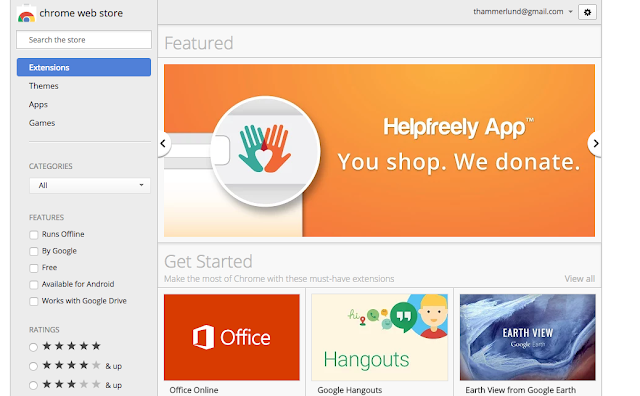
I learned that the URL docs.google.com/create will make a Google Doc. I wanted to have a button to do this, instead of typing it in every time. 

One way to do this is to make a Bookmark. And I tried that. But the bookmark didn't have a favicon (image) and it looked a little dull. It was functional, but I wanted to have an image and I wanted to make a Chrome Extension.

So I did.

          
(Extension Links updated 2021)

I wish I could say that I understood the whole structure and was able to write it myself, but I wasn't. I was able to, however, understand enough to piece together snippets of code I found and realize what from the tutorial I did not need.


Maybe this is how coding should be taught. Maybe after having lessons in the basics, students should be given opportunities to take existing code and modify it how they see fit. 

It was exciting to see my app published where anyone can find it (after I get a few reviews, it might be listed higher). I think most of all, it was a good feeling to complete it after so many failures.

Saturday, February 11, 2017

Design a Flag

In the end, we teachers are really just salespeople. If the students aren't interested in what they are learning, it is harder to motivate them to learn. But when students are eager, there is no stopping them.

In our MYP Design course, we aim to push students to use authentic clients. When they have an actual client, the whole design process is actually easier for them since they are able to discuss what the client wants.

A few student-created flags. Can you guess where they are from?


In the beginning of the year, we used design scenarios - one of which being a Design a Flag scenario I adapted from a 99PI episode on flag design. (And looking at it again, I forgot to have them first design a one-by-one-and-a half inch flag. Note to self.)

Some students did pretty well, but those who weren't interested were lost through the whole project.

Next time ... 
Reflecting on the unit, I wonder how it could have been made more engaging. Could I have had all them make a flag for the country, city, family (clan), or the school? That way they could brainstorm and draw inspiration from each other as well as share research. This feels like something I would do in elementary school, though.

If I were to try this project again, I might use 99designs.com. They have design projects that might be good for students to follow the design process when someone has written out the directions beforehand. It also gives them an authentic chance to design for a client.

Also, I forgot that it is recommended you design your flag on a 1" by 1.5" rectangle. That way you can judge how it might look from a distance and keep the objects simple.